
PDFsam v3 is finally out! Few bug fixes, new website, new MSI for Windows and DMG for MacOS. This is the first stable release where everything that was in version 2.x has been rewritten and hopefully everything is better. As I said before this release doesn’t include visual modules, we are currently working on them (the old ones and many new ones) and we are also working on a new application that will include them.
As you can see PDFsam Enhanced is now our commercial offer, a flexible and powerful fully fledged PDF editor the we provide in partnership with Lulu Software and that will be the commercial companion supporting the free and open source PDFsam Basic.
New v3.0.0.M4 ready!
Among the other things in this version we fixed an issue preventing PDFsam to start on Mac, an issue with the page selection in the selection table, we added a new and less intrusive news panel and we added the Windows MSI package. The Mac DMG package coming soon!
You can download it here
Time to try PDFsam 3.0.0.M2!
After a long time finally the new 3.0.0.M2 is out, ready to be tested! It took us a while to reach this point and the reason is that we changed the PDF engine behind PDFsam, moving from iText to SAMBox, a fork of PDFBox that we maintain and where we applied tons of changes in the past months. It has been a tremendous effort for us but we now have a deeper understanding of the PDF specification and the low level code that powers PDFsam, this allows us to go full hands when we want to fix a bug or add a feature, from the GUI down to the PDF engine.
As usual you can download it here and report any issue here.
Next is coming the MSI installer and other platform packages.
Currently not available the visual modules, they will be developed in the future and perhaps included in a separate distribution.
PDFsam 3.0.0.M1 out!
I just released the first milestone for PDFsam v3. The workspace missing feature has been implemented together with few bug fixes and some useful user suggestions. Platform specific installers are still missing but you can test it anyway, just unzip the bundle and run it using the provided script in the bin subdirectory. Feel free to report any issue here and remember, it requires Java 8.
Enjoy
Time to play with PDFsam v3!
Time has come, finally!
For those of you willing to test a highly unstable PDFsam v3 BETA release, here is the zip bundle. Few things worth mentioning:
- Only the zip bundle is available, no MSI, DMG or other installers yet
- It’s the first public and testable version, don’t expect it to be stable and production ready
- Workspace related functionalities are not yet implemented
- Visual modules are not yet implemented
- Feedbacks, ideas, suggestions are welcome
- It requires Java 8
PDFsam 2.2.4 is out
Hi,
I just released PDFsam 2.2.4 where PDF rotate is fixed and works again. Please let me know if there is any issue with it.
Andrea
Fixing PDF rotate
Hi,
it seems the latest update introduced a bug in the PDF rotate functionality. I am working on it, it should be fixed soon, meanwhile, if you need to rotate a PDF please use PDFsam 2.2.2.
PDFsam 2.2.3 released
Hi,
I had few unpublished changes on PDFsam 2.x so I decided to publish a new release. This is probably going to be the last 2.x release since v3 is getting closer and closer.
Let me know if there is any issue with it.
Andrea
Merge PDF with PDFsam v3
Hi everybody,
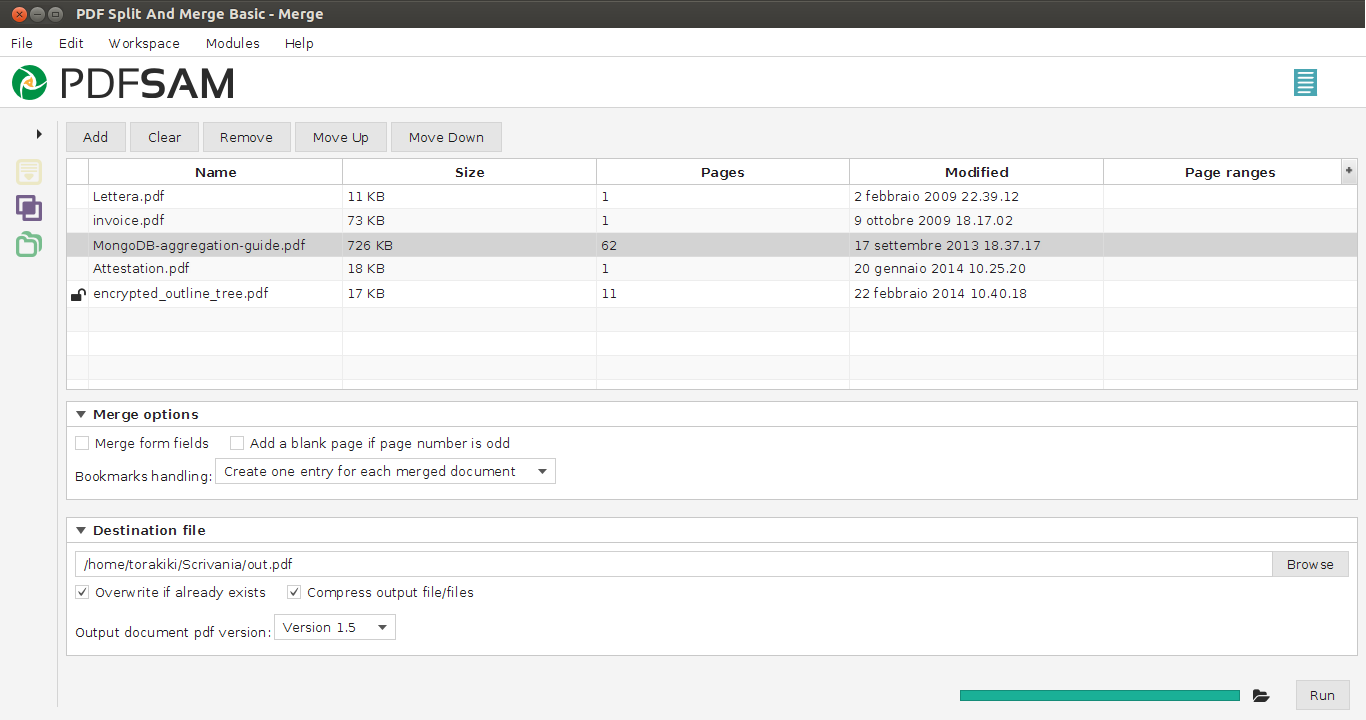
today PDFsam v3 performed its very first task merging pdf files.
There’s still quite a lot of work to do but I wanted to share the good news, the merge pdf module of PDFsam v3 kind of works and it’s going to be the first one to be finalized. I still don’t have any bundle for you to test and I don’t know yet when I will, but things are moving, I have screen shots to prove it 🙂
Progress indicator

Hi,
I just finished to build the progress indicator I’ll most probably use in PDFsam v3 to display task progress for pdf merge, split etc. It’s a JavaFX control and, since it can be reused, I created a separated repository for it so people can clone it and do whatever they want with it. Here on GitHub.